Pages

Thursday, May 9, 2013

New Format for 'What you'll need' Section

You may have noticed tables like this one popping up around the blog.


They are intended to make it easier to determine if your netbook can handle a game at a glance. In case you're unsure of what some information means, I've explained it all below.

Platforms
Don't know which platform your netbook is built on? All you need to know is which GPU you have.

GMA 950 = Diamondville
GMA 3150 = Pineview
GMA 36x0 = Cedar Trail
Radeon HD 62x0/72x0 = Ontario
Radeon HD 63x0/73x0 = Zacate
ION & ION 2: self-explanatory
Colors
It's easy enough to tell the difference between red and green, but what about the different shades, and what do they mean?

Red - You can't play the game on this platform.

Orange - There's a chance you can play the game with some overclocking (mainly on Diamondville netbooks); in the case of Cedar Trail, it means the hardware is theoretically capable of playing the game, but is being held back by Intel's atrocious driver.

Yellow - Cedar Trail only. It means the game will theoretically work, but hasn't been tested.

Light Green - With exceptions, the platform can handle the game well. These exceptions are specified in the Notes.

Green - Think of this as a 'Gaming with Netbooks Seal of Approval'. The game will run on all processor/graphics configurations in that platform (with enough RAM, that is). For Cedar Trail, it means the game has been tested and runs with a satisfactory framerate.

I've only prepared tables for games that only work on more powerful netbooks. In other words, if a featured game is headed by 'Recommended: Depends', then there'll be a table. Games with 'Recommended: YES' or 'NO' don't need one, for obvious reasons. Games like StarCraft 2 that fall under the questionable category will be explained with text, rather than a table.

Monday, April 15, 2013

Gaming with Netbooks Is Now on YouTube!

After a lot of tinkering with FRAPS's recording capabilities and the Handbrake video encoder, I have now set up a YouTube channel, dedicated to people trying to game with netbooks. My first video is a demo of Project64, which is available here. Much of my free time will now be dedicated to creating and posting more videos of previously featured games, so don't expect frequent posts here for a while.

Enjoy!

Thursday, March 28, 2013

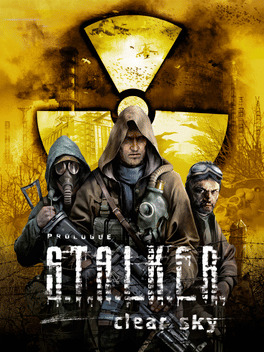
Featured Game: S.T.A.L.K.E.R.: Clear Sky

Plays on the same hardware as SoC
Year: 2008
Genre: First-Person Shooter, Survival Horror
Recommend: Depends


If you can run S.T.A.L.K.E.R.: Shadow of Chernobyl on your netbook, you'll be happy to know that its prequel, Clear Sky, will run on exactly the same hardware. The minimum system requirements for the game are unchanged, although it takes more juice to run the game with more eye candy, like volumetric light and fire, DirectX 10 support, and fancy weather effects. If you enjoyed the first game, it wouldn't hurt to give Clear Sky a try, and flex some GPU muscle in the process.

What you'll need

Reviews and Awards

Clear Sky earned some mixed reviews; on average, the game is the worst-rated in the S.T.A.L.K.E.R. series. The best rating came from GamesTM, with a 90/100 for "transform[ing] grim fantasy into a startlingly real-world experience." On the other hand, X-Play wasn't so kind, awarding Clear Sky a 60% for its boring environments, numerous bugs, and antiquated gameplay. GameSpot nominated the game for Best Atmosphere in 2008, but it was shot down by Dead Space.

Tips

OK, I'll admit it. There's no netbook out there that meets Clear Sky's recommended requirements.  I suggest starting off at medium settings at your netbook's native resolution, then tweaking settings from there.
http://upload.wikimedia.org/wikipedia/commons/e/e9/Stalker_Clear_Sky_screenshot_god_rays_01.jpg
Sunbeam effects; thanks, Wikipedia

Monday, March 11, 2013

Featured Game: Nerf Arena Blast

A colorful, Unreal Engine-powered shooter that's well worth a download 

Year: 1999
Genre: First-Person Shooter
Recommend: YES


Colorful neon arenas? Nerf darts instead of bullets? A complete absence of the concept of death? Yep, NAB's a kid's game, for sure. That doesn't mean you can't play it, of course. Nerf Arena Blast runs very well on most netbooks, in theory, anyway. Since it's based on the first Unreal Engine, it runs like a slug on Cedar Trail netbooks unless software rendering is used, and even then, fullscreen mode doesn't work. DirectX mode on a Diamondville netbook with the stock 1 GB of RAM works just fine at native resolution in fullscreen, and at a solid 60 fps, no less. Even if you are stuck with faulty drivers, NAB is still worth checking out.You can download it for free at Abandonia. Keep in mind that the free download doesn't include the original music from the CD, and will instead play any audio disk you have mounted in a virtual or external CD drive.

What you'll need

As far as hardware goes, Nerf Arena Blast runs on just about anything. You might want some friends to play with on a LAN game too, as the bots aren't particularly skilled. This is a kid-friendly game, after all.

Reviews and Awards

Nerf Arena Blast has been met with mostly positive reviews. IGN awarded NAB a, 8.8/10, praising the gameplay and lasting appeal with scores of 9 in those categories. GameSpot gave a slightly lower score of 7.0, saying the game is "really fun", but suffers from poor AI and online support.

Tips

Having trouble with NAB on a Cedar Trail netbook? Set your 3D renderer to Software, then drag the game window toward the top of the screen until it turns a translucent blue. It'll expand to fill the screen. That's the best option we N2x00 owners have for the game at the moment, until alternate renderers become available or Intel fixes their drivers, both of which are unlikely.
Methinks I need more ammo. 

Wednesday, February 13, 2013

Featured Game: Street Fighter X Mega Man

A disappointing resource hog
Year: 2012
Genre: Action + Platform
Recommend: Depends


Ah, nostalgia. Both the Street Fighter and Mega Man series have let their marks in gaming history. Now these two classics have come together with the collaboration of fans and Capcom. It's too bad that the game overloads most netbooks, even with its NES-style 2D graphics. On my netbook, the game runs at about 2 fps. Fortunately, higher-end netbooks can handle the game.

What you'll need
Reviews and Awards
While not the groundbreaking game of the century, by any imaginable means, the game has enjoyed largely positive reviews. IGN and Destructoid rated it a 7/10, saying the game is "solid" and "fun," but lacks replay value and a save system (version 2 of the game implemented a password system). GameRankings and Metacritic both give SFXMM a rating of approximately 71%. On the other hand, Edge magazine gave the game a 5/10, saying the level design is inconsistent and functionality is limited.

Tips
It's a little hard to give any tips when the game won't run at a tolerable speed. If you have a subpar netbook, don't bother with this game.
A pain to run in more ways than one.

Thursday, January 24, 2013

The Future of Netbooks: Upcoming Chips from Intel and AMD

It's been said in many places that the netbook is dead. That may be true, but future processors from AMD and Intel could make the netbook drought a temporary hibernation. Intel finally seems to be focusing on jacking up the performance of its Atom processors (as opposed to further reducing power consumption), which will give AMD a run for its money and netbooks a desparately needed shot in the arm.


Intel: Bay Trail Promises Quad Core and 3x Better Graphics

Hot Hardware posted some leaked Intel slides on the 3rd of this month on their upcoming Bay Trail platform. To date, Intel has put the highest priority on shrinking the Atom's energy footprint, going from 8.5 W in the original Diamondville + 945GSE chipset combination to 5.6 W with Cedar Trail and the NM10 chipset (both worst-case scenarios), while making only small performance increases. Now, Intel is finally trying to clear the stigma of poor performance from its Atom line with performance-focused upgrades.
 The new Atoms, scheduled for release sometime in 2014, feature an architecture redesigned from the ground up. First, Intel is moving to a 22 nm process technology, which means the processor's transistors are smaller and packed together more densely. Secondly, the Bay Trail Atoms will be SoC's (system-on-a-chip). This means that the chipset, graphics, and CPU are all on the same die, which reduces power consumption and makes for a more efficient manufacturing process. The CPU itself will be a out-of-order quad-core solution, with burst speeds of up to 2.7 GHz. For an Atom, that's super fast, although I suspect the mobile parts (the ones netbook enthusiasts care about) won't be boosted that high. Current Atoms use in-order execution, which means the CPU runs all commands in the order they are presented, which reduces performance. Out-of-order execution allows Bay Trail to select the most efficient order to process data. The Bay Trail platform will support up to 8 GB of memory, the same as AMD's Brazos line. Memory speeds for Bay Trail-M remain at a maximum of 1066 MHz, just like Cedar Trail. It's unclear whether dual-channel memory will be supported. 

Perhaps the most exciting upgrade is to the graphics. Intel is leaving PowerVR graphics behind, and instead using their own HD Graphics processor. That means all of the graphics driver issues that haunt Cedar Trail are no more, and Intel netbooks will finally get the DirectX 11 and OpenGL 3.3 support they need. The clock rate for the new GPU has not been disclosed yet, but I suspect it won't matter, because Intel's HD Graphics on the market now are lightyears beyond any netbook GMA GPU. Also included is hardware-accelerated H.264, MPEG-2, and WMV encoding, as well as accelerated decoding/playback for more video formats than Cedar Trail supported.

Because the chipset will be fused with the processor, Bay Trail enjoys some small reductions in power consumption over previous generations of Atoms. Power consumption for Bay Trail-M is estimated to be between 4 and 6.5 W for low-end parts and 10 W for the high-end. Cedar Trail currently takes about 5 to 8 W.

AMD: Temash & Kabini Deliver Much Improved Performance
AMD APUs

AMD demoed its upcoming Temash and Kabini APU's at CES 2013. According to Trusted Reviews, both designs are SoC's, just like Intel's Bay Trail.  Temash is intended to be used in tablets and hybrid tablets/laptops. It will replace the current-gen Hondo chips. (In case you're wondering why I've never mentioned Hondo before, it's because Hondo is nearly identical to the Brazos C-series chips.) AMD expects    Temash to have double the graphical power of Hondo, as well as dual-core and quad-core configurations. 

Kabini is set to replace today's Brazos 2.0 as the platform of choice for power-hungry netbook users (power-hungry is a relative term). Like Temash, it will have 2-core and 4-core options. Power consumption is expected to drop by 17% compared to Brazos 2.0, while delivering 50% more performance. Both Temash and Kabini are moving to 28nm processes, essential for competing with the threats of Intel and ARM. Also, AMD's APU's are reaching the market this year, far before Intel.

In-depth data on AMD's future platforms is not available at the moment, but I expect a major battle from ARM, AMD, and Intel. This competition will drive up performance and drive down prices, and that's a big win for consumers. The question is, can netbooks be revived by newer hardware?

We'll just have to wait and see.


Tuesday, January 15, 2013

AMD Makes Small Improvements to Brazos 2.0 Line

Before they unleash their Temash and Kabini platforms (more on that in a future post), AMD has released some small upgrades for their current-gen Brazos 2.0 platform. The new processors, the E1-1500 and E2-2000, are direct replacements to the existing E1-1200 and E2-1800, respectively.  Compared to the E1-1200, the E1-1500 gets a speed boost of 80 MHz (1.48 GHz vs 1.4), which is hardly noticeable. The GPU also gets a small push of 29 MHz (529 MHz vs 500). You might notice this difference, but it's not enough to get you playing any new games. On the high end, the E2-2000's CPU is 50 MHz faster than its predecessor (1.75 GHz vs 1.7 GHz); again, insignificant. The GPU gets clocked up to 700 MHz over the previous 680 MHz. Both new processors retain the RAM speeds of the procs they replace (DDR3/1066 for E1-1500, DDR3/1333 for E2-2000).

On the whole, these new platform bumps are nothing to be excited about. If all other factors are the same, however, there's no reason to buy a netbook/laptop with the older processors. If you need a computer soon (i.e. you can't wait for the next generation), now's a good time.

Tuesday, December 18, 2012

AMD's Newish Fusion Processor, the C-70

http://upload.wikimedia.org/wikipedia/en/thumb/1/13/AMD_Radeon_logo.svg/2000px-AMD_Radeon_logo.svg.png
AMD netbooks have this sticker, typically
 On September 1st of this year, AMD silently released its new C-70 processor, which can be considered a successor to their older C-60 part. The processor itself is nearly identical to the previous model. The only difference is the integrated graphics processor, which is now called the Radeon HD 7290 instead of the 6290, clocked at the same speeds, 276 MHz and 400 MHz for boosted mode, respectively. Some sites say the C-70 has Radeon HD 6290 graphics, so I suspect the new name is for purely marketing reasons. On the chipset side, the C-70 comes with AMD's updated chipset, the A68M, instead of the older A50M chipset that lacks USB 3.0 and native SD card and Ethernet support. Currently, the C-70 can be found in large netbooks such as the Acer Aspire One found here at Newegg, shown below. It comes with one USB 3.0 port and a multicard reader, unsurprisingly enough, plus a 64-bit copy of Windows 8. The new C-70 is nothing to be excited about, but should be worth the consideration of new netbook buyers or those wanting to upgrade an old single-core Atom netbook.
Acer Aspire One AO725-0494 AMD Dual-Core Processor C-70(1.00GHz) 11.6" 4GB Memory 320GB HDD AMD Radeon HD 6290 Notebook
The Acer Aspire One AO725-0494
 

Tuesday, December 11, 2012

Featured Game: OpenArena

Like Quake III Arena, but open source!
Year: 2005
Genre: First-person Shooter
Recommend: YES

Remember Quake III Arena back in the day? It was a heck of a lot of fun, and still is, but if you're looking for something new, or just want to support the open source community, OpenArena is a must-download. Not only does it feature better graphics than Quake III, but it's less CPU-intesive in some circumstances. Huzzah!
What you'll need
OpenArena is very easy on your netbook's delicate hardware. The only relevant requirement is an OpenGL card, which all netbooks should have.
Reviews and Awards
I didn't have time to dive into reviews for OpenArena, but a simple Google search found that people really like the game. There are some complaints about the clothing of some (female) characters, which clothing is nearly nonexistent. OpenArena was the base used to create L3DGEWorld, a  visualization program for network data. OA has also been used to test streaming graphics from a server in computer science studies.
Tips
If you have kids that play OpenArena, or are offended by the almost-nudity in the game, you can relax. Removing this questionable content is easy. Just open up the 'baseoa' directory in the main game folder and delete 'pak2-players-mature.pk3'. That's all it takes. In the place of the deleted characters are clones of whichever player you're using when you start a map. Know that you won't be able to join a pure server with the package file missing.

This is the final map of single-player mode. Don't fall to your death!


Tuesday, December 4, 2012

How to Make Your Netbook More Awesome with ReadyBoost


Netbook kinda slow? Word takes forever to open? Don't wanna crack open your netbook to upgrade the RAM? There's an easy solution to all of these problems. It's called ReadyBoost, and it's as simple as popping in an SD card and clicking a few times. You could be a few bucks away (or none, if you have a card handy) from a faster netbook.

How It Works
Hard drive on left, solid state drive on right. Know the difference! Credit goes to appleinsider.com for this image.
Traditional hard drives are built using platters that hold microscopic bits of data. A device called an actuator arm moves back and forth across the platters to grab the magnetic chunks of data and send them to the processor inside the hard drive, which in turn sends the data to the computer. Because the actuator arm has to move back and forth across multiple platters to get data, hard drives are quite slow at random reads. Enter flash storage. Flash storage uses a special chip to store data, so it doesn't give a rip where the data is on the chip. It can just nab data from anywhere and present it to the computer quickly. ReadyBoost caches often-accessed data on the flash device, and when it's faster to pull data from the flash storage, ReadyBoost does so. ReadyBoost can even compress data to store more cache on the chosen device.
 
Which Flash Device to Use?
 
OK, you could use a USB flash drive for ReadyBoost. That's a less-than-ideal solution, as you'd have a bulky drive sticking out of your netbook that you have to be sure not to break. There's a better way. Most, if not all, netbooks have an SD card slot. SD cards don't protrude from your netbook, so you have one less thing to worry about. At an absolute minimum, a 256 MB card will work. Will it make your netbook faster? No! You need a lot more space than a quarter of a gigabyte. Microsoft recommends having 1-3x the amount of RAM available for ReadyBoost, thus a netbook with 1 GB of RAM should have 1-3 GB of ReadyBoost space, and 4 are even better. Speed is of paramount importance; if the card is too slow, ReadyBoost won't work at all. The best way to see if any given card is acceptable is to do your research. Read as many customer reviews as you can. Newegg is a great site for this purpose. I currently use a Transcend 8 GB Class 6 SDHC card.
 
How to Set Up ReadyBoost
 
The first step is a given: insert the card and wait for it to initialize. Once that's done, you should back up any data on the card; if it's empty, just proceed. 
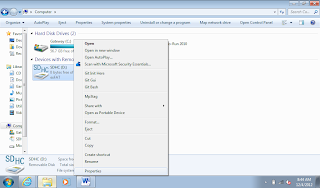
Right click on your SD card in My Computer, then click Format.
Change the settings so they look like this (except for the capacity field). Then click Start!
Right click on the icon for your newly formatted SD card and click on Properties.
Click on the ReadyBoost tab. Make sure the window looks like this (alternatively, scroll down to see your other options). Click Apply, and that's it!
 
In case you're wondering why I had you format your card as exFAT with a 32 MB cluster size, it's for speed. exFAT is Microsoft's proprietary filesystem specifically for flash drives, and when coupled with an enormous cluster size, much more speed can be wrung from your SD card. If you don't want to use the entire card for ReadyBoost, you can click 'Use this device' and use the slider to specify how much space you want to use. If you plan on using your card for more than ReadyBoost, it's a good idea to reduce the cluster size, so any other files you put on the card won't waste obscene amounts of space.
 
 
To get a good idea of how much of a performance boost you can expect from ReadyBoost, go here. Keep in mind that Windows 7 does a better job of boosting your netbook than Vista, which is what Anandtech used in their benchmarks. Also know that netbooks with SSD's (solid state drives) won't benefit at all from ReadyBoost, because SSD's are flash storage drives themselves, so adding more flash storage won't speed anything up. If you have a slow hard drive, though, ReadyBoost is the solution.