Pages

Showing posts with label Nvidia ION. Show all posts

Thursday, May 9, 2013

New Format for 'What you'll need' Section

You may have noticed tables like this one popping up around the blog.


They are intended to make it easier to determine if your netbook can handle a game at a glance. In case you're unsure of what some information means, I've explained it all below.

Platforms
Don't know which platform your netbook is built on? All you need to know is which GPU you have.

GMA 950 = Diamondville
GMA 3150 = Pineview
GMA 36x0 = Cedar Trail
Radeon HD 62x0/72x0 = Ontario
Radeon HD 63x0/73x0 = Zacate
ION & ION 2: self-explanatory
Colors
It's easy enough to tell the difference between red and green, but what about the different shades, and what do they mean?

Red - You can't play the game on this platform.

Orange - There's a chance you can play the game with some overclocking (mainly on Diamondville netbooks); in the case of Cedar Trail, it means the hardware is theoretically capable of playing the game, but is being held back by Intel's atrocious driver.

Yellow - Cedar Trail only. It means the game will theoretically work, but hasn't been tested.

Light Green - With exceptions, the platform can handle the game well. These exceptions are specified in the Notes.

Green - Think of this as a 'Gaming with Netbooks Seal of Approval'. The game will run on all processor/graphics configurations in that platform (with enough RAM, that is). For Cedar Trail, it means the game has been tested and runs with a satisfactory framerate.

I've only prepared tables for games that only work on more powerful netbooks. In other words, if a featured game is headed by 'Recommended: Depends', then there'll be a table. Games with 'Recommended: YES' or 'NO' don't need one, for obvious reasons. Games like StarCraft 2 that fall under the questionable category will be explained with text, rather than a table.

Thursday, March 28, 2013

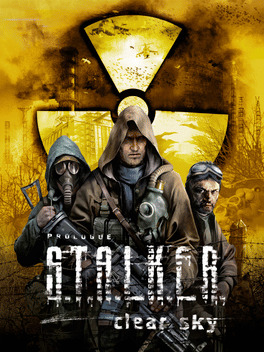
Featured Game: S.T.A.L.K.E.R.: Clear Sky

Plays on the same hardware as SoC
Year: 2008
Genre: First-Person Shooter, Survival Horror
Recommend: Depends


If you can run S.T.A.L.K.E.R.: Shadow of Chernobyl on your netbook, you'll be happy to know that its prequel, Clear Sky, will run on exactly the same hardware. The minimum system requirements for the game are unchanged, although it takes more juice to run the game with more eye candy, like volumetric light and fire, DirectX 10 support, and fancy weather effects. If you enjoyed the first game, it wouldn't hurt to give Clear Sky a try, and flex some GPU muscle in the process.

What you'll need

Reviews and Awards

Clear Sky earned some mixed reviews; on average, the game is the worst-rated in the S.T.A.L.K.E.R. series. The best rating came from GamesTM, with a 90/100 for "transform[ing] grim fantasy into a startlingly real-world experience." On the other hand, X-Play wasn't so kind, awarding Clear Sky a 60% for its boring environments, numerous bugs, and antiquated gameplay. GameSpot nominated the game for Best Atmosphere in 2008, but it was shot down by Dead Space.

Tips

OK, I'll admit it. There's no netbook out there that meets Clear Sky's recommended requirements.  I suggest starting off at medium settings at your netbook's native resolution, then tweaking settings from there.
http://upload.wikimedia.org/wikipedia/commons/e/e9/Stalker_Clear_Sky_screenshot_god_rays_01.jpg
Sunbeam effects; thanks, Wikipedia

Tuesday, November 13, 2012

Netbook Chipset Comparison

Sure, info on processors and graphics is useful, but it doesn't tell the whole story of a netbook. It's worth taking a look at the feature sets of a netbook to ultimately help you decide which first netbook to buy, or whether an upgrade is worth your time and money.


Confused? Never fear, I'll explain this chart in its entirety.

Which chipset is which?
The best way to identify your chipset is to know which processor you have. Atom N2x0 processors use either Intel's 945GSE or Nvidia's MCP79MX chipset. The former utilizes Intel's GMA 950 graphics processor, while the latter comes with ION graphics. All Atom netbook processors succeeding the Diamondville series use the NM10 chipset. AMD's netbook processors use the A50M and A68M chipsets, with the former being used for first-generation Brazos netbooks.
PCI and PCIe Support
PCI and PCIe (stands for Peripheral Component Interface, the 'e' is 'Express') are standardized ports on nearly all mainstream computers, used for adding devices and functionality. For example, my netbook has a Wi-Fi adaptor and a multicard reader on the PCIe bus. The difference between PCI and PCIe is the age of the technology and their speed. PCI crawls at 132 MB/s, while PCIe zooms along at 8 GB/s on Nvidia's chipset. For the A50M and A68M chipsets, 4 x1 lanes are available from the chipset, and 1 x4 link is provided from the CPU, both at PCIe 2.0 speeds, which, for a x4 link, are 2 GB/s.
Ethernet Support
Ethernet is what allows you to connect to a wired network. Most chipsets have native support, but the NM10 does not. Native just means support is built-in, thus it's less expensive to implement in a netbook, as a third-party controller is unnecessary. The numbers in the table indicate the possible operating speeds of the Ethernet port, in megabits/second.
IDE and SATA
IDE and SATA are interfaces that connect drives, like hard drives or optical drives, to the main computer. IDE is much older and slower than SATA, as it is an older technology. IDE tops out at 133 MB/s, while SATA can go over 700 MB/s, with higher speeds on the way in the future. Notice the number of ports decreased in the move from the A50M to the A68M. This isn't a big deal for netbooks, because you can't cram more than 2 hard drives into a tiny netbook chassis.

USB Ports

Over the years, USB has undergone major overhauls since its official release in 1996. USB 1.1, the first widely accepted version of USB, released in 1998, can only transfer data at 1.4 MB/s. For some reason, the A50M chipset supports it, but I highly doubt you'll find a USB 1.1 port on a netbook. Next came USB 2.0, capable of speeds exceeding 57 MB/s, in theory. This is the most common USB version, since it's been around since 2000. Finally, the latest-and-greatest USB 3.0 can zoom by at nearly 600 MB/s. It's relatively new, with the official specification released in 2008. The only chipset natively supporting USB 3.0 is the A68M, so implementation of USB 3.0 is cheaper.

RAID Support

You likely don't need to worry about RAID, since it requires multiple hard drives. With RAID, you can configure your computer for high-speed data access or safety in the event of hard drive failure. You probably won't use it.
SD Card Support

As a special bonus to the A68M chipset, native SD card support is added to make Brazos 2.0 netbooks cheaper. Most netbooks have an SD card slot, and rely on a third party controller to make it work. Because no separate controller is needed, the manufacturer can build a Brazos 2.0 netbook at a lower cost, and pass those savings on to you.
Time to Upgrade?

Ultimately, the decision to upgrade is entirely up to you. I can only give advice on the matter. If you're running a first or second-gen Intel netbook with non-Nvidia graphics, I strongly suggest biting the bullet and picking up a current-gen AMD netbook. Yes, it will almost certainly be bigger than 10.1" and have less battery life, but its power in games is well worth the negative aspects. With Windows 8 available though, an 11.6" screen ain't such a bad idea, as 1024x600 isn't enough anymore. Keep in mind that the A68M uses 18% less power at idle than the A50M. Intel's graphics drivers for its Cedar Trail platform are in a sorry state right now, so I don't recommend one over whatever you already have. 

Wednesday, July 18, 2012

Featured Game: Portal

No Intel graphics for newbies
http://upload.wikimedia.org/wikipedia/en/9/9f/Portal_standalonebox.jpgYear: 2007
Genre: Puzzle + Platform
Recommend: Depends


If you're a daring soul who loves to tweak and mod your netbook to get any game to work, you can probably get Portal up and running. If you're not, Intel's graphics won't cut it. Fortunately, Nvidia and AMD have made netbooks excellent Portal machines.

What you'll need


Reviews and Awards

Portal received excellent ratings all around the board, plus a big ol' list of awards, some of which are for GLaDOS's epic villianness (is that a word?). GameSpy stated "What Portal lacks in length, it more than makes up for in exhilaration." Metacritic ratings average 90/100, with GameRankings' rates very slightly different at 89.15%.

Tips

Go here for advice on Portal for Intel's graphics processors. Do it. It's in the description.