Pages

Thursday, January 24, 2013

The Future of Netbooks: Upcoming Chips from Intel and AMD

It's been said in many places that the netbook is dead. That may be true, but future processors from AMD and Intel could make the netbook drought a temporary hibernation. Intel finally seems to be focusing on jacking up the performance of its Atom processors (as opposed to further reducing power consumption), which will give AMD a run for its money and netbooks a desparately needed shot in the arm.


Intel: Bay Trail Promises Quad Core and 3x Better Graphics

Hot Hardware posted some leaked Intel slides on the 3rd of this month on their upcoming Bay Trail platform. To date, Intel has put the highest priority on shrinking the Atom's energy footprint, going from 8.5 W in the original Diamondville + 945GSE chipset combination to 5.6 W with Cedar Trail and the NM10 chipset (both worst-case scenarios), while making only small performance increases. Now, Intel is finally trying to clear the stigma of poor performance from its Atom line with performance-focused upgrades.
 The new Atoms, scheduled for release sometime in 2014, feature an architecture redesigned from the ground up. First, Intel is moving to a 22 nm process technology, which means the processor's transistors are smaller and packed together more densely. Secondly, the Bay Trail Atoms will be SoC's (system-on-a-chip). This means that the chipset, graphics, and CPU are all on the same die, which reduces power consumption and makes for a more efficient manufacturing process. The CPU itself will be a out-of-order quad-core solution, with burst speeds of up to 2.7 GHz. For an Atom, that's super fast, although I suspect the mobile parts (the ones netbook enthusiasts care about) won't be boosted that high. Current Atoms use in-order execution, which means the CPU runs all commands in the order they are presented, which reduces performance. Out-of-order execution allows Bay Trail to select the most efficient order to process data. The Bay Trail platform will support up to 8 GB of memory, the same as AMD's Brazos line. Memory speeds for Bay Trail-M remain at a maximum of 1066 MHz, just like Cedar Trail. It's unclear whether dual-channel memory will be supported. 

Perhaps the most exciting upgrade is to the graphics. Intel is leaving PowerVR graphics behind, and instead using their own HD Graphics processor. That means all of the graphics driver issues that haunt Cedar Trail are no more, and Intel netbooks will finally get the DirectX 11 and OpenGL 3.3 support they need. The clock rate for the new GPU has not been disclosed yet, but I suspect it won't matter, because Intel's HD Graphics on the market now are lightyears beyond any netbook GMA GPU. Also included is hardware-accelerated H.264, MPEG-2, and WMV encoding, as well as accelerated decoding/playback for more video formats than Cedar Trail supported.

Because the chipset will be fused with the processor, Bay Trail enjoys some small reductions in power consumption over previous generations of Atoms. Power consumption for Bay Trail-M is estimated to be between 4 and 6.5 W for low-end parts and 10 W for the high-end. Cedar Trail currently takes about 5 to 8 W.

AMD: Temash & Kabini Deliver Much Improved Performance
AMD APUs

AMD demoed its upcoming Temash and Kabini APU's at CES 2013. According to Trusted Reviews, both designs are SoC's, just like Intel's Bay Trail.  Temash is intended to be used in tablets and hybrid tablets/laptops. It will replace the current-gen Hondo chips. (In case you're wondering why I've never mentioned Hondo before, it's because Hondo is nearly identical to the Brazos C-series chips.) AMD expects    Temash to have double the graphical power of Hondo, as well as dual-core and quad-core configurations. 

Kabini is set to replace today's Brazos 2.0 as the platform of choice for power-hungry netbook users (power-hungry is a relative term). Like Temash, it will have 2-core and 4-core options. Power consumption is expected to drop by 17% compared to Brazos 2.0, while delivering 50% more performance. Both Temash and Kabini are moving to 28nm processes, essential for competing with the threats of Intel and ARM. Also, AMD's APU's are reaching the market this year, far before Intel.

In-depth data on AMD's future platforms is not available at the moment, but I expect a major battle from ARM, AMD, and Intel. This competition will drive up performance and drive down prices, and that's a big win for consumers. The question is, can netbooks be revived by newer hardware?

We'll just have to wait and see.


Tuesday, January 15, 2013

AMD Makes Small Improvements to Brazos 2.0 Line

Before they unleash their Temash and Kabini platforms (more on that in a future post), AMD has released some small upgrades for their current-gen Brazos 2.0 platform. The new processors, the E1-1500 and E2-2000, are direct replacements to the existing E1-1200 and E2-1800, respectively.  Compared to the E1-1200, the E1-1500 gets a speed boost of 80 MHz (1.48 GHz vs 1.4), which is hardly noticeable. The GPU also gets a small push of 29 MHz (529 MHz vs 500). You might notice this difference, but it's not enough to get you playing any new games. On the high end, the E2-2000's CPU is 50 MHz faster than its predecessor (1.75 GHz vs 1.7 GHz); again, insignificant. The GPU gets clocked up to 700 MHz over the previous 680 MHz. Both new processors retain the RAM speeds of the procs they replace (DDR3/1066 for E1-1500, DDR3/1333 for E2-2000).

On the whole, these new platform bumps are nothing to be excited about. If all other factors are the same, however, there's no reason to buy a netbook/laptop with the older processors. If you need a computer soon (i.e. you can't wait for the next generation), now's a good time.

Tuesday, December 18, 2012

AMD's Newish Fusion Processor, the C-70

http://upload.wikimedia.org/wikipedia/en/thumb/1/13/AMD_Radeon_logo.svg/2000px-AMD_Radeon_logo.svg.png
AMD netbooks have this sticker, typically
 On September 1st of this year, AMD silently released its new C-70 processor, which can be considered a successor to their older C-60 part. The processor itself is nearly identical to the previous model. The only difference is the integrated graphics processor, which is now called the Radeon HD 7290 instead of the 6290, clocked at the same speeds, 276 MHz and 400 MHz for boosted mode, respectively. Some sites say the C-70 has Radeon HD 6290 graphics, so I suspect the new name is for purely marketing reasons. On the chipset side, the C-70 comes with AMD's updated chipset, the A68M, instead of the older A50M chipset that lacks USB 3.0 and native SD card and Ethernet support. Currently, the C-70 can be found in large netbooks such as the Acer Aspire One found here at Newegg, shown below. It comes with one USB 3.0 port and a multicard reader, unsurprisingly enough, plus a 64-bit copy of Windows 8. The new C-70 is nothing to be excited about, but should be worth the consideration of new netbook buyers or those wanting to upgrade an old single-core Atom netbook.
Acer Aspire One AO725-0494 AMD Dual-Core Processor C-70(1.00GHz) 11.6" 4GB Memory 320GB HDD AMD Radeon HD 6290 Notebook
The Acer Aspire One AO725-0494
 

Tuesday, December 11, 2012

Featured Game: OpenArena

Like Quake III Arena, but open source!
Year: 2005
Genre: First-person Shooter
Recommend: YES

Remember Quake III Arena back in the day? It was a heck of a lot of fun, and still is, but if you're looking for something new, or just want to support the open source community, OpenArena is a must-download. Not only does it feature better graphics than Quake III, but it's less CPU-intesive in some circumstances. Huzzah!
What you'll need
OpenArena is very easy on your netbook's delicate hardware. The only relevant requirement is an OpenGL card, which all netbooks should have.
Reviews and Awards
I didn't have time to dive into reviews for OpenArena, but a simple Google search found that people really like the game. There are some complaints about the clothing of some (female) characters, which clothing is nearly nonexistent. OpenArena was the base used to create L3DGEWorld, a  visualization program for network data. OA has also been used to test streaming graphics from a server in computer science studies.
Tips
If you have kids that play OpenArena, or are offended by the almost-nudity in the game, you can relax. Removing this questionable content is easy. Just open up the 'baseoa' directory in the main game folder and delete 'pak2-players-mature.pk3'. That's all it takes. In the place of the deleted characters are clones of whichever player you're using when you start a map. Know that you won't be able to join a pure server with the package file missing.

This is the final map of single-player mode. Don't fall to your death!


Tuesday, December 4, 2012

How to Make Your Netbook More Awesome with ReadyBoost


Netbook kinda slow? Word takes forever to open? Don't wanna crack open your netbook to upgrade the RAM? There's an easy solution to all of these problems. It's called ReadyBoost, and it's as simple as popping in an SD card and clicking a few times. You could be a few bucks away (or none, if you have a card handy) from a faster netbook.

How It Works
Hard drive on left, solid state drive on right. Know the difference! Credit goes to appleinsider.com for this image.
Traditional hard drives are built using platters that hold microscopic bits of data. A device called an actuator arm moves back and forth across the platters to grab the magnetic chunks of data and send them to the processor inside the hard drive, which in turn sends the data to the computer. Because the actuator arm has to move back and forth across multiple platters to get data, hard drives are quite slow at random reads. Enter flash storage. Flash storage uses a special chip to store data, so it doesn't give a rip where the data is on the chip. It can just nab data from anywhere and present it to the computer quickly. ReadyBoost caches often-accessed data on the flash device, and when it's faster to pull data from the flash storage, ReadyBoost does so. ReadyBoost can even compress data to store more cache on the chosen device.
 
Which Flash Device to Use?
 
OK, you could use a USB flash drive for ReadyBoost. That's a less-than-ideal solution, as you'd have a bulky drive sticking out of your netbook that you have to be sure not to break. There's a better way. Most, if not all, netbooks have an SD card slot. SD cards don't protrude from your netbook, so you have one less thing to worry about. At an absolute minimum, a 256 MB card will work. Will it make your netbook faster? No! You need a lot more space than a quarter of a gigabyte. Microsoft recommends having 1-3x the amount of RAM available for ReadyBoost, thus a netbook with 1 GB of RAM should have 1-3 GB of ReadyBoost space, and 4 are even better. Speed is of paramount importance; if the card is too slow, ReadyBoost won't work at all. The best way to see if any given card is acceptable is to do your research. Read as many customer reviews as you can. Newegg is a great site for this purpose. I currently use a Transcend 8 GB Class 6 SDHC card.
 
How to Set Up ReadyBoost
 
The first step is a given: insert the card and wait for it to initialize. Once that's done, you should back up any data on the card; if it's empty, just proceed. 
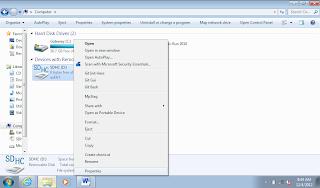
Right click on your SD card in My Computer, then click Format.
Change the settings so they look like this (except for the capacity field). Then click Start!
Right click on the icon for your newly formatted SD card and click on Properties.
Click on the ReadyBoost tab. Make sure the window looks like this (alternatively, scroll down to see your other options). Click Apply, and that's it!
 
In case you're wondering why I had you format your card as exFAT with a 32 MB cluster size, it's for speed. exFAT is Microsoft's proprietary filesystem specifically for flash drives, and when coupled with an enormous cluster size, much more speed can be wrung from your SD card. If you don't want to use the entire card for ReadyBoost, you can click 'Use this device' and use the slider to specify how much space you want to use. If you plan on using your card for more than ReadyBoost, it's a good idea to reduce the cluster size, so any other files you put on the card won't waste obscene amounts of space.
 
 
To get a good idea of how much of a performance boost you can expect from ReadyBoost, go here. Keep in mind that Windows 7 does a better job of boosting your netbook than Vista, which is what Anandtech used in their benchmarks. Also know that netbooks with SSD's (solid state drives) won't benefit at all from ReadyBoost, because SSD's are flash storage drives themselves, so adding more flash storage won't speed anything up. If you have a slow hard drive, though, ReadyBoost is the solution.

Wednesday, November 21, 2012

Featured Game: Left 4 Dead 2

Even more demanding than its predecessor
http://upload.wikimedia.org/wikipedia/en/b/ba/Left4Dead2.jpgYear: 2009
Genre: First-person Shooter, Survival Horror
Recommend: Depends


Thought the first Left 4 Dead was tough on your netbook? I have some bad news for you, then; its sequel is even more demanding. The only thing L4D2 doesn't need more of is CPU processing power, which is good, considering that the CPU is one of the biggest bottlenecks for an AMD netbook. Still, if you can play this game, you'll be rewarded with a zombie-slaying experience that's every bit as good, if not better, than the original.

What you'll need

Reviews and Awards

L4D2 received reviews much like its predecessor, which is to say, very positive. The aggregator sites mentioned in my L4D1 feature gave the sequel nearly the same scores, around 89%. IGN, who positiviely reviewed the first game, "considered that the game improved on the first in every way, and that anyone who liked the concepts introduced by the first game should buy the second." (Wikipedia) GameSpot gave L4D2 a 9/10, a 0.5 point increase over the first Left 4 Dead. Eurogamer called it "overflowing with personality."

Tips

It's very important to be running the fastest RAM possible for intensive games like L4D2. I highly recommend nothing less than DDR3/800. To see what speed your RAM is, download and install CPU-Z at cpuid.com. Look for a field that says 'PC6400 (400 MHz)' or something similar. If your RAM is that fast or faster, you're all set. If not, you may want to consider a RAM upgrade.
http://www.ngohq.com/attachments/screenshots/1355d1227273859-left-4-dead-screenshots-hl2-2008-11-21-14-32-13-01.jpg
Screenshot from ngohq.com

Tuesday, November 13, 2012

Netbook Chipset Comparison

Sure, info on processors and graphics is useful, but it doesn't tell the whole story of a netbook. It's worth taking a look at the feature sets of a netbook to ultimately help you decide which first netbook to buy, or whether an upgrade is worth your time and money.


Confused? Never fear, I'll explain this chart in its entirety.

Which chipset is which?
The best way to identify your chipset is to know which processor you have. Atom N2x0 processors use either Intel's 945GSE or Nvidia's MCP79MX chipset. The former utilizes Intel's GMA 950 graphics processor, while the latter comes with ION graphics. All Atom netbook processors succeeding the Diamondville series use the NM10 chipset. AMD's netbook processors use the A50M and A68M chipsets, with the former being used for first-generation Brazos netbooks.
PCI and PCIe Support
PCI and PCIe (stands for Peripheral Component Interface, the 'e' is 'Express') are standardized ports on nearly all mainstream computers, used for adding devices and functionality. For example, my netbook has a Wi-Fi adaptor and a multicard reader on the PCIe bus. The difference between PCI and PCIe is the age of the technology and their speed. PCI crawls at 132 MB/s, while PCIe zooms along at 8 GB/s on Nvidia's chipset. For the A50M and A68M chipsets, 4 x1 lanes are available from the chipset, and 1 x4 link is provided from the CPU, both at PCIe 2.0 speeds, which, for a x4 link, are 2 GB/s.
Ethernet Support
Ethernet is what allows you to connect to a wired network. Most chipsets have native support, but the NM10 does not. Native just means support is built-in, thus it's less expensive to implement in a netbook, as a third-party controller is unnecessary. The numbers in the table indicate the possible operating speeds of the Ethernet port, in megabits/second.
IDE and SATA
IDE and SATA are interfaces that connect drives, like hard drives or optical drives, to the main computer. IDE is much older and slower than SATA, as it is an older technology. IDE tops out at 133 MB/s, while SATA can go over 700 MB/s, with higher speeds on the way in the future. Notice the number of ports decreased in the move from the A50M to the A68M. This isn't a big deal for netbooks, because you can't cram more than 2 hard drives into a tiny netbook chassis.

USB Ports

Over the years, USB has undergone major overhauls since its official release in 1996. USB 1.1, the first widely accepted version of USB, released in 1998, can only transfer data at 1.4 MB/s. For some reason, the A50M chipset supports it, but I highly doubt you'll find a USB 1.1 port on a netbook. Next came USB 2.0, capable of speeds exceeding 57 MB/s, in theory. This is the most common USB version, since it's been around since 2000. Finally, the latest-and-greatest USB 3.0 can zoom by at nearly 600 MB/s. It's relatively new, with the official specification released in 2008. The only chipset natively supporting USB 3.0 is the A68M, so implementation of USB 3.0 is cheaper.

RAID Support

You likely don't need to worry about RAID, since it requires multiple hard drives. With RAID, you can configure your computer for high-speed data access or safety in the event of hard drive failure. You probably won't use it.
SD Card Support

As a special bonus to the A68M chipset, native SD card support is added to make Brazos 2.0 netbooks cheaper. Most netbooks have an SD card slot, and rely on a third party controller to make it work. Because no separate controller is needed, the manufacturer can build a Brazos 2.0 netbook at a lower cost, and pass those savings on to you.
Time to Upgrade?

Ultimately, the decision to upgrade is entirely up to you. I can only give advice on the matter. If you're running a first or second-gen Intel netbook with non-Nvidia graphics, I strongly suggest biting the bullet and picking up a current-gen AMD netbook. Yes, it will almost certainly be bigger than 10.1" and have less battery life, but its power in games is well worth the negative aspects. With Windows 8 available though, an 11.6" screen ain't such a bad idea, as 1024x600 isn't enough anymore. Keep in mind that the A68M uses 18% less power at idle than the A50M. Intel's graphics drivers for its Cedar Trail platform are in a sorry state right now, so I don't recommend one over whatever you already have. 

Monday, October 22, 2012

Featured Game: Nexuiz

This game rocks. 'Nuf said.
Year: 2005
Genre: First-person Shooter
Recommend: YES


If there is any doubt in your mind that open source games are fun, get rid of it. Nexuiz is an absolutely fantastic shooter with spectacular graphics, fast-paced gameplay, and low system requirements (by today's standard's, anyway). Don't get me wrong, though; Nexuiz can really stress even the mighty Radeon HD 7340 in top-of-the-line Brazos 2.0 netbooks. No matter what kind of netbook you have, Nexuiz is definitely worth your time.

What you'll need
Any netbook with 1 GB of RAM (512 MB for ION 2) can run Nexuiz. Make sure to balance the settings to match your graphics card's strengths and weaknesses. For example, the GMA 950 and 3150 don't have hardware transformation and lighting, so it would be smart to drop lighting and geometry to their minimums. Nexuiz really brings out the benefits of the Cedar Trail platform; I get playable framerates with geometry and texture detail maxed out at native resolution, despite Intel's horrid drivers.

Reviews and Awards
Nexuiz has been featured in numerous major tech magazines. In September 2006, PC Gamer included it in an article about the impact of free games. PC User put the game on its May 2008 and August 2009 cover disks. Maximum PC included the game in its March 2007 issue. Phoronix deemed the game "the best open source FPS we have played, with refined gameplay and graphics that take advantage of modern hardware." GameStop once held a PC gaming competition using Nexuiz.

Tips

IllFonic developed a game, also named Nexuiz,  released this year based on the original. Because the name is now licensed to IllFonic, the original Nexuiz developers created a fork named Xonotic. The game I'm featuring is referred to as Nexuiz Classic by IllFonic. Remember that now!
Sure, the graphics probably won't look like this on a netbook, but they're still gorgeous.

Tuesday, October 9, 2012

Featured Game: RollerCoaster Tycoon

For those who love money
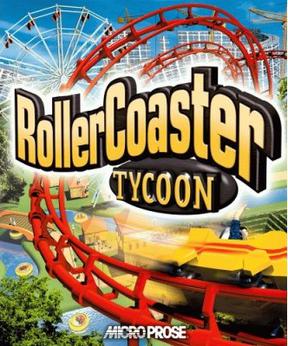
http://upload.wikimedia.org/wikipedia/en/1/1d/Rct-box.jpgYear: 1999
Genre: Construction & Management Simulation
Recommend: YES


I'm the kind of person who likes more than solely action-oriented games, e.g. first-person shooters. If you're anything like me, RollerCoaster Tycoon ought to be on your list of favorites. It's one of the most addictive constructive and management simulations ever, and, come on, who doesn't like making money, even it is virtual?

What you'll need
RCT is a 2D game from 1999. You can play it. Really, you can.
Reviews and Awards
RCT was a huge success because of its uber-realistic model of an amusement park, as well as its originality. GameSpot and IGN gave the game 8.6 and 8.5/10, respectively. Some negatives: There's no sandbox mode, the isometric viewpoint can sometimes be irritating, and you can't fast forward time. The theme park industry and roller coaster enthusiasts applauded the game for its realism.
Tips
I strongly encourage you to get your hands on the Corkscrew Folllies and Loopy Landscapes expansions packs. More rides, more lanscaping options, more music, more scenarios (much more challenging than the stock scenarios), more everything! How can you go wrong?
I have no idea why I can't take screenshots, so here's Wikipedia's.

Wednesday, October 3, 2012

Featured Game: AssaultCube

Free, optimized, awesome
http://upload.wikimedia.org/wikipedia/en/thumb/f/fd/Logo_on-white.svg/2000px-Logo_on-white.svg.png
Year: 2006
Genre: First-person Shooter
Recommend: YES
Requested by NSDCars5


When I first heard about AssaultCube, I was impressed. A free shooter capable of multiplayer functionality on a 56k dialup connection? Meow. My positive opinion didn't change as I played on. On my desktop. See, Intel's ever-worthless GMA 3600 driver support crashes AC right before 3D rendering begins. That's annoying. Still, if you have a non-Cedar Trail netbook, this one's worth looking at.
 
What you'll need
AssaultCube, like the engine it's based off of, is cross-platform. Unlike Cube, AC is more advanced, but you can still run it on any netbook, provided that you have working drivers. I've seen a GMA 3150 netbook crank out 60 fps on medium settings on YouTube. Impressive!
 
Reviews and Awards

An editor at reloaded.org gave AC a 3.7/5 (users rated it 3.1) for its graphics, shooting action, and "lots of options." On the other hand, it is criticized for its lack of music and map diversity, among other things. Softpedia gave it 2 stars/5, much to the dismay of certain commenters. Users of SourceForge recommended the game 80% of the time.

Tips

If you're as frustrated with the current GMA 36x0 driver situation as I am, go here. This petition is intended for tablets, but Cedar Trail netbooks and Intel tablets use the same graphics core. If any positive change comes about from the petition, it will likely affect netbooks, too.

I can't get a screenshot, so Wikipedia comes to the rescue.